
Mealime Alternative: What to Do Before Mealime Closes on October 21, 2026
Mealime will be discontinued on October 21, 2026. Mealime points its users to Meals Hub, a free planner inside Albertsons Companies grocery apps. Chefless is a different kind of app: it fits households who plan meals together and keep their own recipes, and it does not build menus from a diet quiz.
Facts about Mealime were checked on October 10, 2026 against Mealime's own pages, linked under Where do these facts come from? Chefless facts come from the current app and its store listings.
When does Mealime close, and what does Mealime tell its users to do?
Mealime will be discontinued on October 21, 2026. Mealime says it is winding down paid subscriptions, that paid subscribers will not be charged again before the closing date, and that all paid-only recipes and features become available to every user. It recommends Meals Hub, which is built into Albertsons Companies grocery apps.
Mealime says Meals Hub carries all of Mealime's recipes plus thousands more, is free, keeps support for dietary preferences and food restrictions, and comes from the same team. It also says Meals Hub works if no Albertsons Companies store is near you, and that a web version opens from the Albertsons Companies store websites. The source for all of this is Mealime's closing page.
If what you liked about Mealime was being handed a ready-made menu, Meals Hub is the closest continuation Mealime itself offers. Look at it first.
What should I do with my Mealime recipes and data before October 21?
Mealime says all personal data will be deleted when the app shuts down, and that some preferences and settings must be set up again inside Meals Hub. Its closing page does not describe a way to export recipes you saved or imported yourself, so keep a copy of anything you want before October 21.
Mealime says its own recipes will continue in Meals Hub, so the recipes to rescue are the ones you wrote or imported yourself. Mealime's help pages describe importing recipes from the web into Your Recipes and do not describe an export. Mealime's privacy policy says users can ask for a copy of their data, though it does not say whether that includes recipes in a form another app can read.
The simplest safe copy is a screenshot of each recipe. Chefless can import up to four screenshots at a time.
What did Mealime do, and which parts will you miss?
Mealime built a week of dinners from a short setup of diet type, allergies, dislikes and servings, then turned the plan into a grocery list sorted by category and walked you through cooking each recipe. Its website says it has over 200 personalization options. That ready-made weekly menu is the one thing Chefless does not replace.
Chefless does not build menus from a diet quiz, does not calculate calories or nutrition, and does not write a weekly plan for you. You choose the recipes and place them on a calendar. Home can suggest a few recipes for tonight, each with a one tap Plan it. The rest of the routine carries over: a recipe collection, a plan for the week and one shopping list.
When does Chefless fit better than Mealime did?
Chefless fits households who plan together. A shared Kitchen gives everyone the same meal calendar, members suggest meals and the Head Chef approves them, and one shopping list is built from the plan. It also fits cooks who keep their own recipes, imported from links, captions, pasted text or up to four photos.
Chefless is a good fit if
- You cook for a partner, family or housemates and want everyone to see and shape the week. Mealime's help pages (last updated in 2019) say it had no in-app way to share a plan or list, and they suggest signing in to the same account on each phone.
- You collect recipes from websites and social posts and want them in one place that you control. See how recipe import works.
- You want the app in Arabic, Spanish or Turkish as well as English.
Look at Meals Hub or another planner if
- You want menus generated from a diet quiz, calorie or nutrition targets, or a set of recipes written for you.
- You want to plan a full week ahead on a free plan. The free Chefless plan reaches two days before and after today, and Chefless Premium opens the whole calendar.
- You need more than five saved recipes without paying.
- You need a web or desktop app. Chefless runs on iPhone and Android.
How does Chefless compare with Mealime, side by side?
Mealime planned your week for you from a quiz. Chefless gives you a calendar you fill from your own recipes, with a shared Kitchen and one shopping list built from the plan. The table lists what Mealime did, what Chefless does, and what Chefless does not do, so you can see the gap before you switch.
Scroll sideways to see every column.
| Topic | What Mealime did | What Chefless does | What Chefless does not do |
|---|---|---|---|
| Weekly plan | Built a week of recipes from a setup quiz covering diet type, allergies, dislikes and servings. Mealime says it has over 200 personalization options. | A week, month and year calendar that you fill with your own recipes. Each planned meal has its own servings. Copy a week repeats a plan, and Home suggests recipes for tonight with one tap on Plan it. | Does not build menus from a quiz or write a plan for you. |
| Recipes | Recipes written by Mealime, plus recipes you imported from the web into Your Recipes. Mealime says its recipes continue in Meals Hub. | Your own recipe book. Import from a recipe website link, a public social post with the recipe in its caption, pasted text, or up to four photos, then review before saving. Follow other cooks and browse For You, Trending, Friends and Seasonal. | Does not include Mealime's recipes. Does not watch videos or listen to audio to find a recipe. |
| Diet needs | Diet type, allergies and dislikes set once and applied to your plan. | Diet tags and filters on recipes, including Halal, Kosher, Vegetarian, Vegan, Pescatarian, Gluten-Free, Dairy-Free, Low FODMAP and Keto (more on diet filters). | Does not apply your allergies to a generated plan or show allergen warnings. Does not certify any recipe as halal or allergen free. |
| Grocery list | One list per plan, sorted into categories that follow a store layout, with room for your own items. | One list from your plan for the days you pick. Repeated ingredients add together and sort by aisle. When the plan changes, Update from plan keeps what you checked and what you added. Send list shares what is left to buy. | Does not order groceries or connect to a store for delivery or pickup. |
| Planning with others | Help pages last updated in 2019 describe no in-app sharing of plans or lists and suggest signing in to one account on every phone. | A Kitchen shares one calendar, one shopping list and members' shared recipes. People join with an invite code. Members suggest meals and the Head Chef, or someone the Head Chef chooses, approves them. | Does not put a person in more than one Kitchen at a time. A free Kitchen holds two members and more need Chefless Premium. |
| Calories and nutrition | Calorie and nutrition information and calorie filters came with Mealime's paid plan. | A calories field on each recipe that you fill in yourself. | Does not calculate nutrition or filter recipes by calories. |
| Price | Free to use, with a paid plan that Mealime is winding down. Mealime says all paid recipes and features are free to every user until it closes. | Free to download with no ads. Chefless Premium costs $5.99 a month or $34.99 a year in US dollars. | Does not hold more than five recipes on the free plan, or plan more than two days before and after today. |
| Where it runs | iPhone, Android and a web app, according to its help pages. | iPhone and Android. | Does not run on the web or on a computer. |
Mealime facts come from the pages listed under Where do these facts come from? Chefless facts come from the current app (1.4) and its store listings.
How do I move my weekly routine to Chefless?
Save your recipes first, then create a Kitchen, plan the week and make one shopping list. In Chefless that means importing recipes from the Recipes tab, creating a Kitchen on the Kitchen tab, adding meals on the Schedule tab, and choosing Generate from schedule on the Shopping tab. Mealime recipes you want to keep need a screenshot first.
-
Save the Mealime recipes you want before October 21
Take a screenshot of each recipe, ingredients and steps included. Mealime says its own recipes continue in Meals Hub, so start with the ones you imported or wrote yourself.
-
Install Chefless and sign up
Get Chefless on the App Store or Google Play, then sign up with Apple, Google or email.
-
Import your recipes
Open the Recipes tab, tap the plus button labeled Add a recipe or cookbook, then tap Import recipe. Choose Use a link to paste a recipe website link or a public social post. Choose Use photos to pick up to four screenshots, cookbook pages or handwritten cards in page order. If a post cannot be read, Chefless offers Paste the recipe text.
Check the draft before you save. Chefless marks anything unclear and leaves a missing amount blank for you to fill in. A free account holds five recipes, so start with your favorites. Chefless Premium has no recipe limit.
-
Create a Kitchen and invite your household
Open the Kitchen tab, tap Create kitchen and give it a name. Tap Invite, then share the invite code or tap Share invite card. Others join with the code. A free Kitchen holds two members including you, and a person can be in one Kitchen at a time.
-
Plan the week
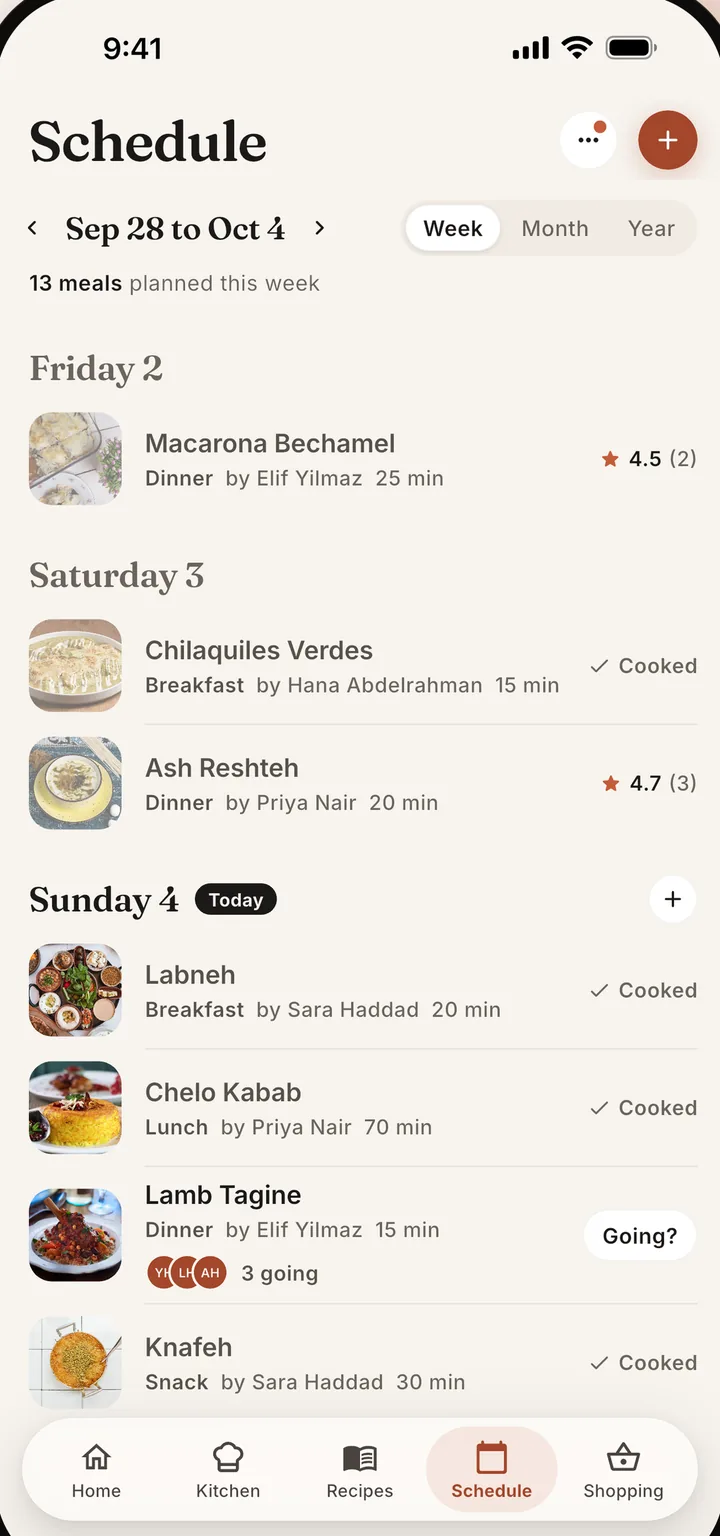
Open the Schedule tab and tap the plus button next to a day, or tap add a meal on a day with nothing planned, or tap Plan it on a meal idea on Home. Members who are not editors send suggestions and the Head Chef approves them. Free accounts plan from two days before today to two days after. Chefless Premium opens the full calendar, which you need to plan a whole week ahead.
-
Shop from one list
Open the Shopping tab, choose Generate from schedule, pick the days and tap Generate shopping list. When the plan changes, tap Update from plan. Send list shares what is left to buy with Messages, WhatsApp or any other app.
How much does Chefless cost compared with Mealime?
Chefless is free to download and shows no ads. A free account holds up to five recipes, one remix, one cookbook, a Kitchen of two members, and planning from two days before today to two days after. Chefless Premium removes those limits for $5.99 a month or $34.99 a year in US dollars.
Other countries see local prices in the store, and you can cancel any time in your store subscription settings. Cook mode, shopping lists, following other cooks and the culinary passport are free. Chefless Premium also adds the AI Recipe Helper, Pantry and What You Can Cook. The pricing page lists everything.
Mealime's paid plan is ending and Mealime says its paid recipes and features are free until it closes. Meals Hub is free.
Frequently asked questions
Why is Mealime shutting down?
Mealime says Albertsons Companies acquired it in 2021 and that its recipes and meal planning tools have been available in Albertsons Companies grocery apps since then. To give people a more streamlined experience, Albertsons Companies is making Meals Hub its main recipe and meal planning platform and moving Mealime customers there (Mealime closing page).
Can I export my recipes from Mealime?
Mealime's closing page does not describe an export, and its help pages cover importing recipes from the web, not exporting them. Mealime's privacy policy says you can ask for a copy of your data. Take a screenshot of each recipe you want to keep, because Mealime says all personal data is deleted when the app shuts down.
What is a good Mealime alternative for a family?
It depends on what you used Mealime for. For ready-made menus, Meals Hub is the route Mealime recommends and it is free. For planning together, Chefless Kitchens give a family one shared calendar and one shopping list built from the plan. Chefless does not generate menus from a diet quiz.
Does Chefless make meal plans from a diet quiz like Mealime?
No. Chefless does not generate menus, set calorie targets or calculate nutrition. You place your own recipes on the calendar, and Home can suggest a few recipes for tonight with one tap on Plan it. Diet tags such as Halal, Vegan, Gluten-Free and Low FODMAP filter recipes, and Chefless does not certify any recipe.
Is Chefless free like Mealime was?
Chefless is free to download with no ads, and the free plan includes Cook mode, shopping lists and a Kitchen of two members. It holds up to five recipes and plans from two days before today to two days after. Chefless Premium is $5.99 a month or $34.99 a year and removes those limits (see pricing).
Where do these facts come from?
Every Mealime fact on this page comes from Mealime's own website and help pages, listed here with what each page supports. All of them were opened on October 10, 2026. Chefless facts come from the current app, its release notes and its store listings. Help pages carry their own last updated dates, shown below where they matter.
- Mealime closing page: closing date, Meals Hub, wind down of the paid plan, data deletion, FAQ.
- Mealime home page: weekly plans, over 200 personalization options, categorized grocery list, hands-free cooking.
- Mealime help: Importing a recipe from the Web: importing into Your Recipes, last updated August 2020.
- Mealime help: How to share: no in-app sharing of lists, iPhone and Android apps, last updated 2019.
- Mealime help: Multi-user accounts: one account on every phone, last updated 2019.
- Mealime help: How the grocery list works: store layout categories and your own items.
- Mealime help: paid plan features: nutrition information and calorie filters.
- Mealime help: Why is the app not available in my country: web application.
- Mealime privacy policy: the right to obtain a copy of your data.